Senders are free. Invite as many as you like.
On Team, clients and teammates who send feedback cost nothing. They see plain statuses, with no mention of agents, sessions or code. Roles and project access decide who sees what, and Goes to decides which developer gets each project’s feedback.
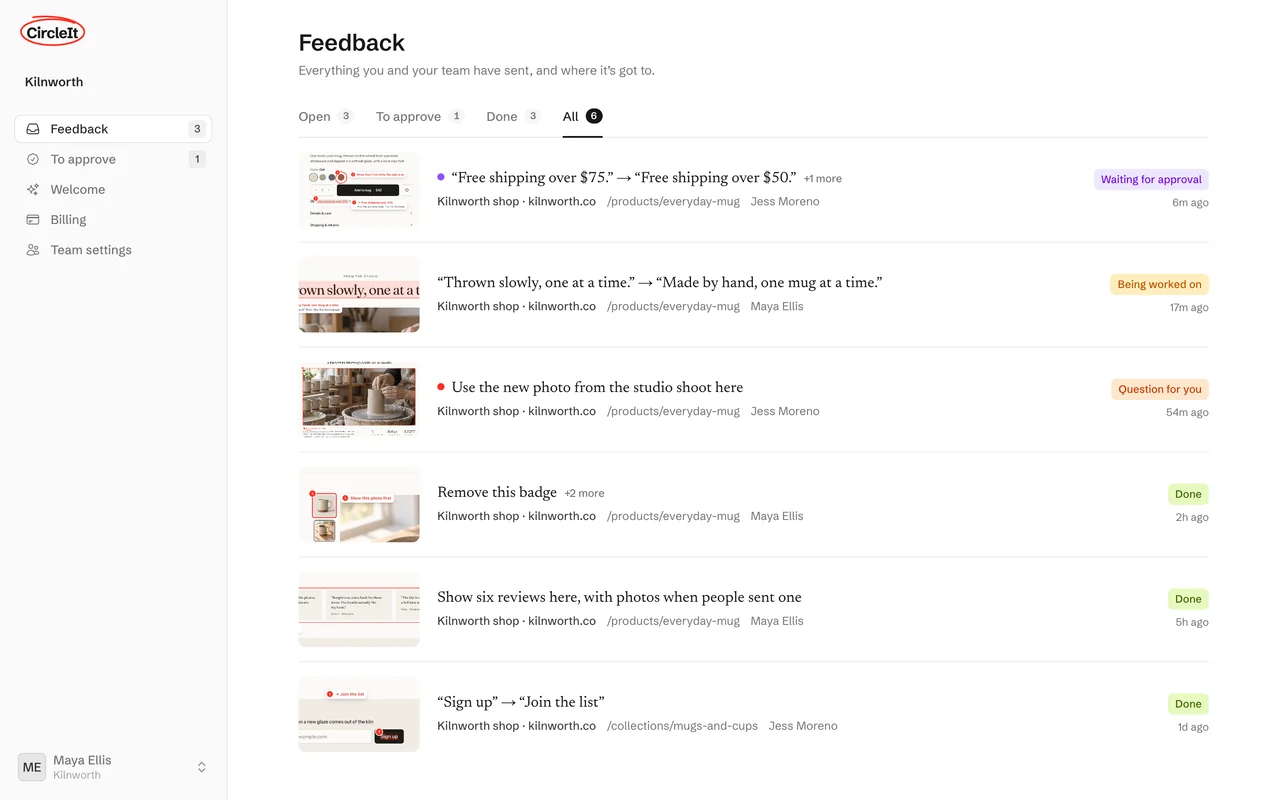
A simple view for senders
People who haven’t connected Claude Code or Codex see their feedback in plain words. They never see agents, sessions, folders or branches. Their extension asks only which site they’re on, and only when it can’t tell.
- They see the reply. When the work is done, the developer’s note shows as Done. A question shows as Question for you, with a box to answer it.
| Developers see | Senders see |
|---|---|
| Awaiting approval | Waiting for approval |
| Pending | Waiting for your developer |
| Delivered | Picked up |
| In progress | Being worked on |
| Resolved | Done |
| Needs info | Question for you |
| Rejected | Not taken forward |
One team, three roles
Everyone is in one team, usually named after your company. Each person has a role, and anyone who connects Claude Code or Codex also gets the Developer badge.
- Owner. Looks after the plan and billing, and does everything an approver does.
- Approver. Approves feedback, invites people and sets up sites.
- Sender. Sends feedback.
- Developer. Anyone, in any role, who connects Claude Code or Codex. You pay for developers. Team includes 1 developer.
Choose who sees each project
A project is open to everyone in the team, or only to the people you tick. The owner and approvers always see every project. Someone who can’t see a project doesn’t see its feedback, and can’t send to it.
- Projects make themselves. There is one for each code repository where an agent runs with CircleIt, plus one for each new site someone sends from. The owner or an approver can add one too.
Goes to: which developer gets it
Each project’s feedback goes to one developer’s Claude Code or Codex. A project goes to the first developer whose Claude Code or Codex opens it. The owner, approvers and developers can change it on the Projects page, or set it to Anyone with it open.
- Your own marks go to your own session. A developer who sends feedback on a project they have open gets it in their own session.
- Waiting feedback follows the change. Change who a project goes to, and anything still waiting goes to the new developer.
- Take one over. Another developer can press Send to my Claude on an item to take it into their own session.
How someone joins
The owner or an approver invites them by email from Team › People. The invitation lasts 3 days.
-
1
Accept the invitation
They create an account with their email, or continue with Google. No team of their own to set up: they join yours.
-
2
Add the extension
From the Chrome Web Store, in Chrome or Edge on a computer. Then they connect it with one click.
-
3
Send feedback
On your site they click CircleIt, circle what they want changed and press Send.
Questions
Do clients need Claude Code or Codex?
No. They need Chrome or Edge on a computer, the extension and your invitation. What they send goes to your developer.
Do senders cost anything?
No. Team is $25 a month and includes 1 developer, the person whose Claude Code or Codex makes the changes. Clients and teammates who send feedback are free, and there is no limit on how many you invite.
Can someone be in two teams?
No. Each person is in one team at a time. Joining another team takes them out of the first. An owner has to delete their own team first.
Can people sign in with Google?
Yes. Continue with Google is on the sign-in page and the invitation sign-up. Passkeys and two-factor authentication are there too, in Settings.
Stop describing it. Circle it.
Your first 10 changes are free. No card needed.